
Download Hekapad – text editor, multilingual support, simple interface, customizable edits, file formats
Overview
Hekapad is a lightweight, free text editor designed for Windows users seeking a straightforward solution for text manipulation. The application focuses on core editing tasks with an emphasis on multilingual support and ease of use. It serves as a reliable utility for individuals who need to edit plain text files without the complexity of full-featured word processors. Whether users are adjusting date and time stamps, modifying configuration files, or preparing log entries, Hekapad provides a focused environment to accomplish these tasks efficiently.
The app caters to a broad range of users, including students, developers, and professionals who work with text-based documents across different languages. Its minimalist interface ensures that users can concentrate on content rather than navigating through cluttered menus. The software is particularly useful in scenarios where file format compatibility and language flexibility are essential, such as editing INI files for software settings or creating multilingual documentation.
Although the developer did not provide additional technical details, Hekapad’s release in December 2021 suggests it has been in use for several years, indicating stability and ongoing relevance in the productivity tool ecosystem. Its ability to save files in multiple formats like TXT, NFO, INI, INF, and LOG further enhances its utility for users who require cross-format compatibility. Hekapad fills a niche for users who value simplicity, speed, and reliability in text editing.
Key Features & Functionality
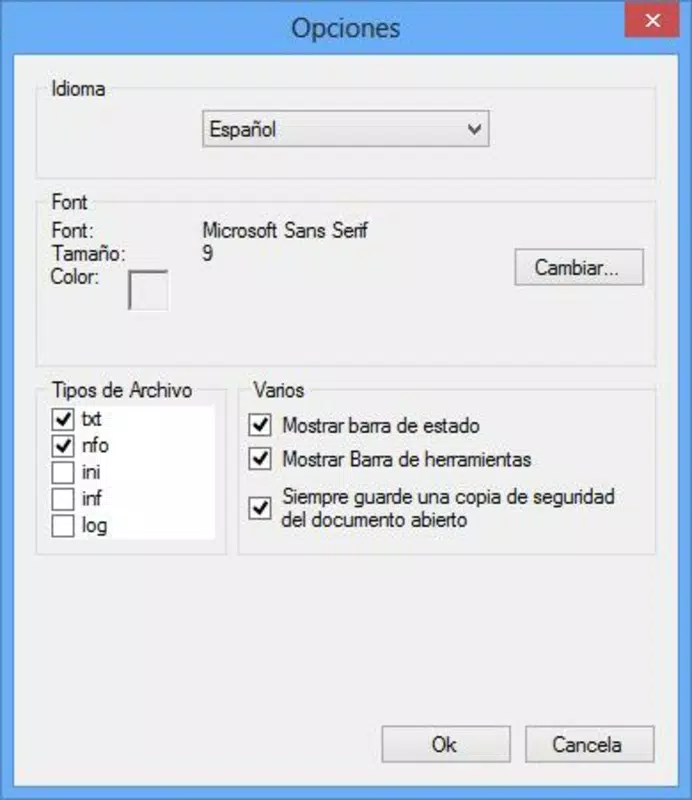
- Multilingual Support: Hekapad is designed to accommodate users working with various languages, enabling seamless editing across different linguistic scripts. This feature is beneficial for users who manage content in multiple languages or collaborate with international teams.
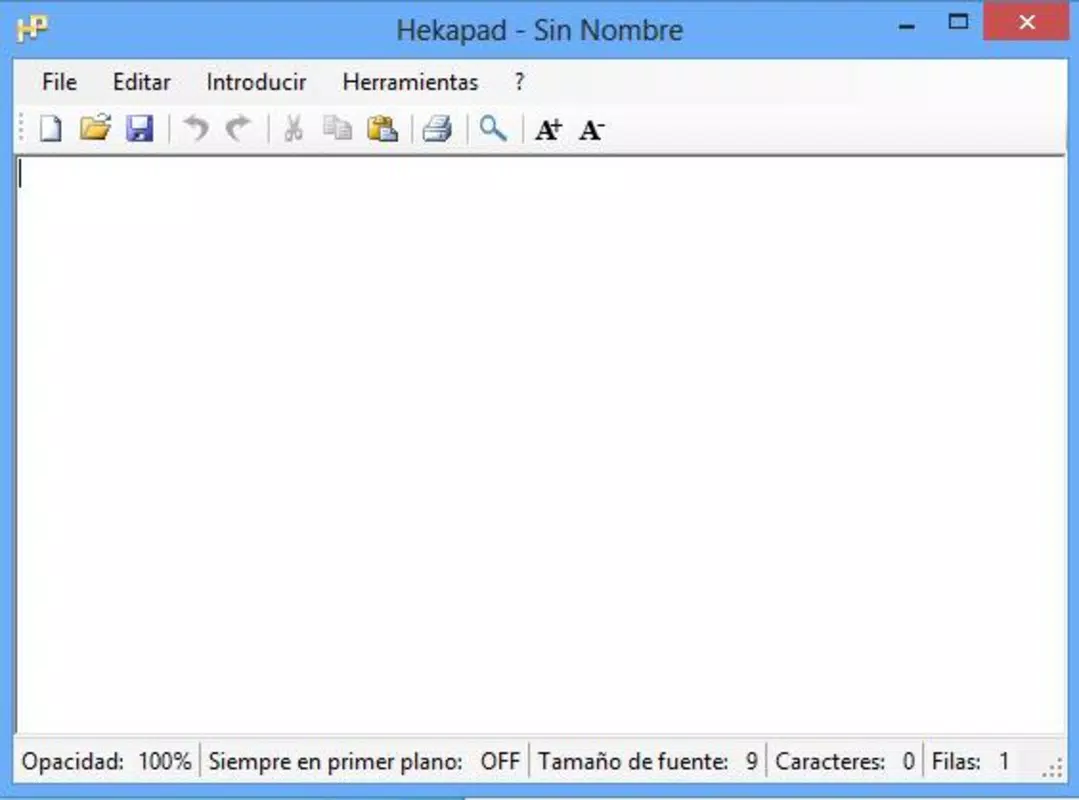
- Simple Interface: The app features a clean, minimalistic design with no unnecessary elements. Users can begin editing immediately without needing to learn complex navigation or shortcuts.
- Customizable Edits: Users can make precise modifications to text, including altering date and time entries and replacing specific symbols. This functionality supports technical tasks such as updating timestamps in logs or modifying configuration syntax.
- Multiple File Formats: Hekapad allows saving documents in several standard formats, including TXT, NFO, INI, INF, and LOG. This flexibility ensures compatibility with various applications and systems that rely on specific file types.
For example, a developer might use Hekapad to edit an INI configuration file for a game or application, adjusting values without needing a full IDE. Similarly, a student preparing a multilingual report can switch between scripts effortlessly. The ability to save in NFO or LOG formats makes it suitable for technical documentation and system logging tasks. These real-world use cases highlight how Hekapad’s features translate into practical value for everyday users.
Interface, UX & Performance
Hekapad’s user interface is characterized by its minimalistic layout, which prioritizes functionality over visual embellishment. The absence of complex menus or toolbars reduces cognitive load, allowing users to focus solely on their text. Navigation is intuitive, with essential actions accessible through clearly labeled options or keyboard shortcuts.
Although the developer did not list formal performance metrics, the app’s small file size of 1.4 MB suggests it is optimized for efficiency. It likely loads quickly and operates smoothly on a wide range of Windows devices, including older or low-resource systems. The responsiveness of the interface appears consistent, with minimal lag during text input and file operations.
Stability is another key aspect. Given its long-standing presence since 2021, Hekapad has likely undergone iterative improvements to maintain reliability. Users can expect consistent behavior when opening, editing, and saving files. The app does not appear to consume excessive system resources, making it a suitable choice for multitasking environments.
Platform Compatibility & Technical Requirements
Hekapad is designed for the Windows platform and requires no specific operating system version beyond the standard Windows environment. The application is available as a standalone executable, which means it does not require installation or administrative privileges to run. The file size is 1.4 MB, indicating a lightweight footprint that is ideal for users with limited storage or slower internet connections.
The developer did not specify minimum OS requirements or compatibility details beyond the platform. However, the app’s small size and lack of complex dependencies suggest it is compatible with most modern Windows systems, including Windows 7 and later versions. Users should ensure their system supports running executable files from external sources, especially when downloading from third-party websites.
Pros and Cons
Pros
- Free to download and use with no hidden costs
- Lightweight design with minimal system resource usage
- Supports multiple file formats for versatile document handling
- Simple, distraction-free interface ideal for quick edits
- Effective multilingual text editing capabilities
Cons
- Specific technical requirements were not listed
- Compatibility with older or non-standard Windows systems is unconfirmed
- Limited to Windows platform; no support for mobile or macOS
- Developer did not provide update frequency or future development plans
- No built-in spell check or advanced formatting tools
FAQ
Is Hekapad safe to download and install?
Yes, Hekapad is a free tool that operates as a standalone executable. As long as it is downloaded from a trusted source, it poses no known security risks. Users should avoid unverified websites to ensure the integrity of the file.
Can I use Hekapad on mobile devices?
Currently, Hekapad is designed exclusively for Windows. There is no official mobile version available for Android or iOS devices.
Does Hekapad support file backups or auto-save?
The developer did not specify whether Hekapad includes backup or auto-save features. Users are advised to manually save their work to prevent data loss.
How often is Hekapad updated?
Specific update details were not provided. The app was released in December 2021, and while it remains functional, the frequency of future updates is unknown.
Can I edit code files with Hekapad?
Yes, Hekapad supports editing plain text files, including configuration files like INI and LOG formats. While it lacks syntax highlighting, it is suitable for basic code or script editing tasks.
Final Thoughts
Hekapad delivers a focused, efficient experience for users who need a no-frills text editor with multilingual support and format flexibility. Its simple interface, small size, and free access make it an appealing choice for quick edits, technical documentation, and cross-language content management. While it lacks advanced features like spell check or syntax highlighting, its core strengths lie in reliability, speed, and ease of use.
For individuals who value minimalism and performance over complexity, Hekapad offers a practical solution. It is particularly well-suited for developers, students, and professionals managing configuration files or multilingual text. The ability to save in multiple formats adds significant value for users working across different software environments.
Download Hekapad now


